
Industry
B2B Auction, Customer Support, SaaS / B2B Software
Technologies
Reactjs, SQL Server, ASP.NET Core, RAG, Redis, Serilog
Customer
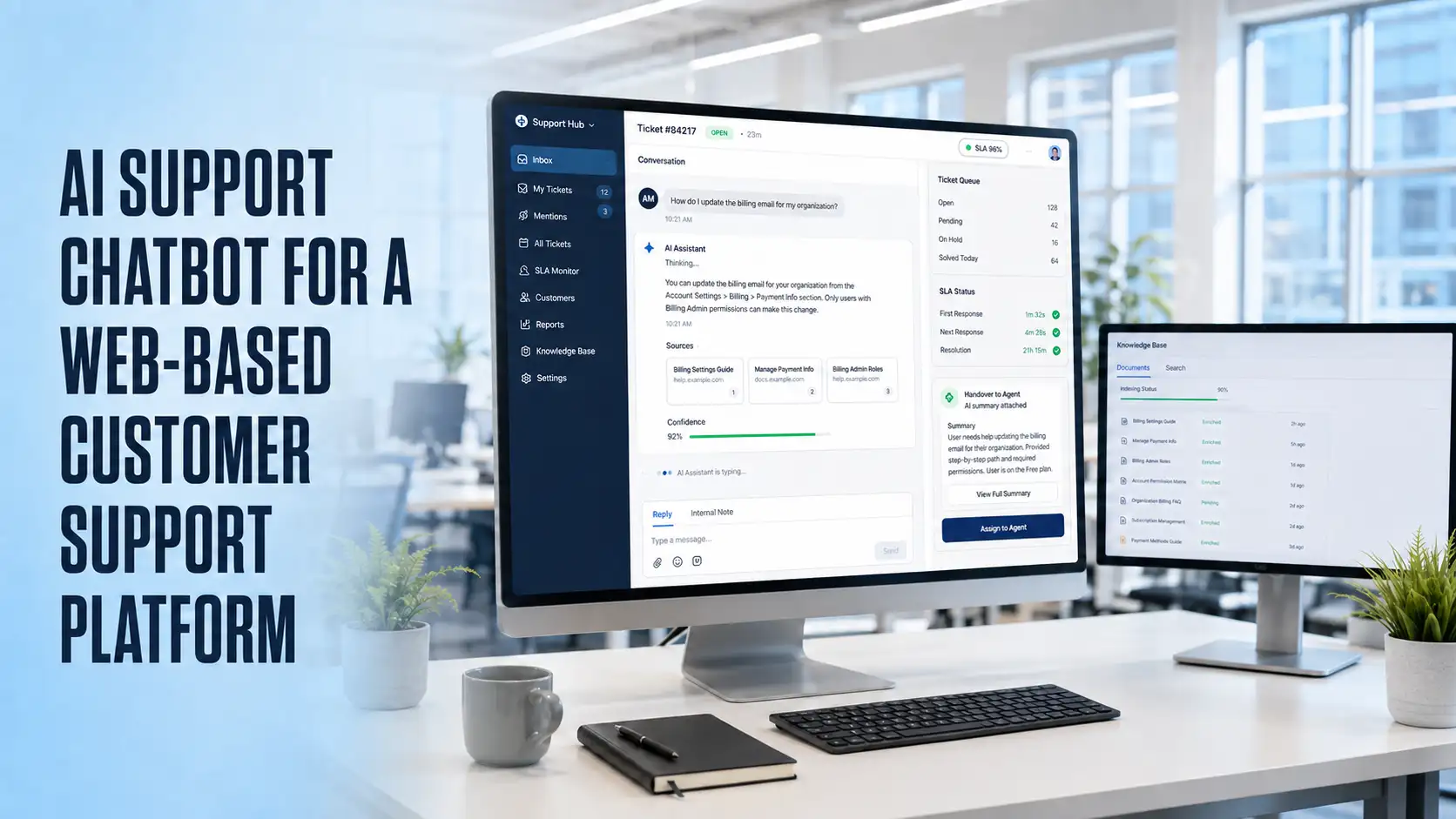
The customer already ran a web-based customer support platform covering ticketing, live chat, a public help centre, SLA tracking and reporting. An AI chatbot was added to the chat widget and help centre to answer routine product questions from the customer’s own documentation, and hand over to a human agent whenever it could not.
The customer provides a support platform used by small and mid-sized software companies to manage customer conversations across email, live chat and a public help centre. Support teams were spending much of the day answering the same product questions by hand, so the customer wanted an AI chatbot inside the existing chat widget that could answer those repeat questions from published documentation and escalate anything else to an agent.
Some of the key blockchain challenges were:
- Many incoming chats were repeat questions already answered in the help centre, but end users rarely searched first.
- Content was spread across help centre articles, PDF guides and release notes, with no single source the chatbot could read.
- A general-purpose model answered confidently and incorrectly about the product, so answers had to be grounded in retrieved documentation.
- Feature availability differed by plan, so a correct answer could still describe something the end user did not have.
- Chats had to hand over to a human agent mid-thread without the end user repeating themselves.
- Perceived response time mattered: a widget that sits silent for a few seconds is treated as broken.
- Transcripts contained personal and account data, and per-conversation AI cost had to stay predictable as volume grew.
Results
- Routine questions are answered in the widget before reaching the support queue, leaving agents the conversations that need a person.
- Escalated chats arrive with transcript and summary attached, so agents start with context.
- Answers grounded in the customer’s own documentation, with visible sources, cut down confidently wrong replies.
- Support leads can correct a bad answer the same day through curated content, without engineering involvement.
- Caching, retrieval limits and per-tenant budgets kept AI cost per conversation predictable as volume grew.
- Unanswered questions are logged, turning the chatbot into a running list of gaps in the help centre.
- Added to the existing chat and ticketing workflow without a rewrite of the wider platform.
Technologies
- React, chat widget & admin console
- .NET Core, backend and AI orchestration
- SQL Server & Entity Framework Core
- OpenAI, answers and summaries
- Text embeddings, vector search & RAG
- SignalR, streamed responses
- Redis, answer and embedding caching
- Azure Blob Storage, source documents
- JWT authentication & Role-Based Access Control
- Serilog, application and AI request logging
- REST APIs, platform and AI integration
- GitHub Actions & Docker, build and deployment
Timeline: 10 Weeks
- Discovery, Content Audit & AI Architecture: 1 week
- Content Ingestion & Vector Index Pipeline: 1.5 weeks
- Retrieval & Answer Generation Engine: 2 weeks
- Chat Widget & Streaming Response UI: 1.5 weeks
- Human Handover & Ticketing Integration: 1.5 weeks
- Admin Console & Feedback Loop: 1.5 weeks
- Testing, Security Review & Deployment: 1 weeks
Suggested case studies
Discover how our expert solutions empower businesses and delight customers.

Ready to Build Something Amazing?
Get in touch with Prishusoft – your trusted partner for custom software development. Whether you need a powerful web application or a sleek mobile app, our expert team is here to turn your ideas into reality.
