In the previous section, we implemented microservices in NestJS using TCP communication. While TCP is simple and suitable for learning and basic use cases, real-world microservices architectures require more robust and scalable communication mechanisms. This is where message brokers like Apache Kafka come into play.
Apache Kafka is a distributed event-streaming platform designed for high throughput, fault tolerance, and scalability, making it a popular choice for microservices communication. In this blog, we will upgrade our NestJS microservices to use Kafka, enabling reliable asynchronous communication and better performance for production-ready systems.
What is Kafka? (Very Simple Explanation)
Apache Kafka is a message broker used to send data between different services in a microservices architecture.
Instead of services communicating directly with each other:
One service publishes a message
Another service consumes the message
Kafka acts as the middle layer that handles message delivery
This approach makes communication more reliable and scalable.
Real-Life Example
Think of Kafka like a post office:
The sender drops a letter at the post office
The receiver collects the letter later
The sender and receiver do not need to know about each other
Kafka ensures that the message is delivered safely, even if the receiver is temporarily unavailable
Why Use Kafka in Microservices?
Using Kafka improves communication between microservices by making them loosely coupled and highly scalable.
TCP vs Kafka Comparison
TCP
Direct service-to-service communication
Services are tightly coupled
Less scalable
No message replay support
Not fault-tolerant
Kafka
Message-based communication
Services are loosely coupled
Highly scalable
Message replay supported
Fault-tolerant and reliable
Kafka is production-ready, industry-standard, and widely used for building scalable microservices systems.
What We Will Build
In this tutorial, we will build four NestJS microservices that communicate with each other using Apache Kafka.
Microservices Overview
1.User Service – Manages user registration and user-related operations
2.Order Service – Handles order creation and order management
3.Payment Service – Processes payments and transactions
4.API Gateway – Acts as a single entry point for client requests and routes them to the appropriate services
Communication Layer
Apache Kafka will act as the message broker, enabling reliable, asynchronous communication between all microservices.
Architecture Overview
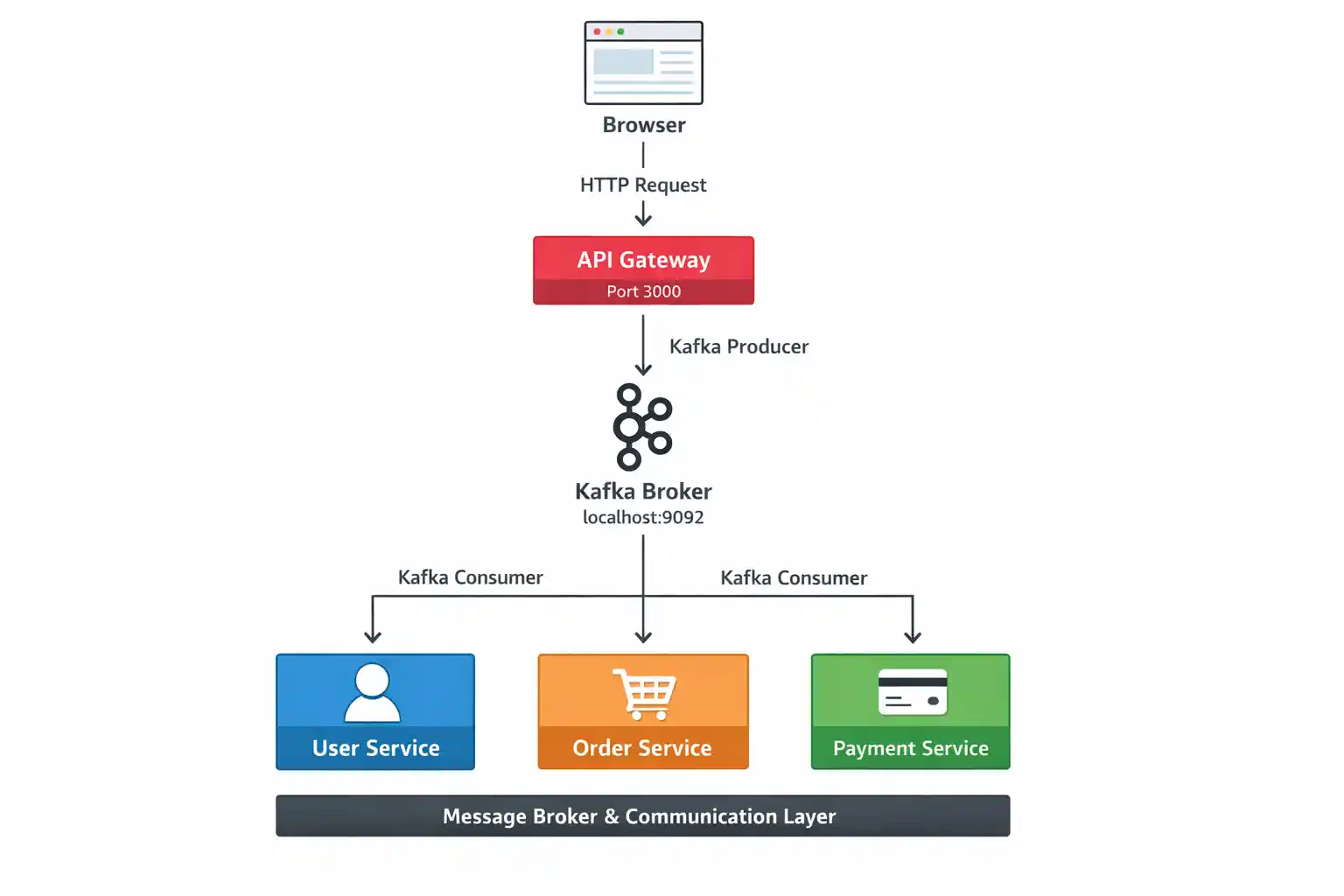
The following architecture illustrates how our NestJS microservices communicate using Apache Kafka.
High-Level Flow
1. The client (browser) sends an HTTP request to the API Gateway.
2. The API Gateway (running on port 3000) acts as the single entry point for all client requests.
3. Instead of calling services directly, the API Gateway produces Kafka messages and sends them to the Kafka Broker (running on localhost:9092).
4. User Service, Order Service, and Payment Service act as Kafka consumers, process the messages, and send responses back through Kafka.
Architecture Diagram
Prerequisites
Node.js (v18+ recommended)
NestJS CLI
Java JDK 8+
Apache Kafka (local install, no Docker, no Zookeeper)
Step 1: Install NestJS CLI
npm i -g @nestjs/cli
Choose npm or yarn and enable TypeScript.
Step 2: Create NestJS Applications
3 Microservices
API Gateway – Client
Create four separate projects:
#1 nest new user-service
#2 nest new order-service
#3 nest new payment-service
#4 nest new api-gateway
Now we have four separate projects, which is the core idea of microservices and each project runs independently.
Get in touch with Prishusoft – your trusted partner for custom software development. Whether you need a powerful web application or a sleek mobile app, our expert team is here to turn your ideas into reality.