In this section, we will rebuild the same NestJS microservices architecture, using gRPC. gRPC is a high-performance, open-source RPC framework that enables fast and efficient request–response communication between microservices using Protocol Buffers (Protobuf) for data serialization.
By using gRPC, microservices communicate through strongly defined contracts, ensuring type safety and consistency across services. This approach is especially well suited for synchronous service-to-service communication in modern distributed systems where low latency and reliability are critical.
What is gRPC?
gRPC is a communication framework that allows one service to call a function of another service as if it were a local method call. It uses Protocol Buffers (proto files) to define the structure of requests and responses and runs on HTTP/2, making it fast and efficient for service-to-service communication.
Why Use gRPC in Microservices?
High performance:
Uses HTTP/2 and binary serialization, resulting in faster communication and smaller payloads.
Strongly typed contracts:
Proto files define clear request and response structures, reducing integration errors between services.
Efficient service-to-service communication:
Ideal for internal, synchronous communication between microservices.
Language agnostic:
Services written in different programming languages can communicate using the same proto definitions.
Built-in tooling support:
Provides features like code generation, streaming, and backward compatibility.
Better scalability:
Well suited for large distributed systems with many interdependent services.
What We Will Build (gRPC Version)
In this section, we will create four NestJS microservices that communicate using gRPC.
Microservices Overview
User Service – Manages user-related operations
Order Service – Handles order creation and management
Payment Service – Processes payments and transactions
API Gateway – Acts as a single HTTP entry point for client requests
Communication Layer
gRPC will serve as the primary communication protocol between services, enabling fast, synchronous, and strongly typed request–response communication.
This setup demonstrates a high-performance microservices architecture using NestJS and gRPC, ideal for internal service-to-service communication.
Architecture Overview (gRPC)
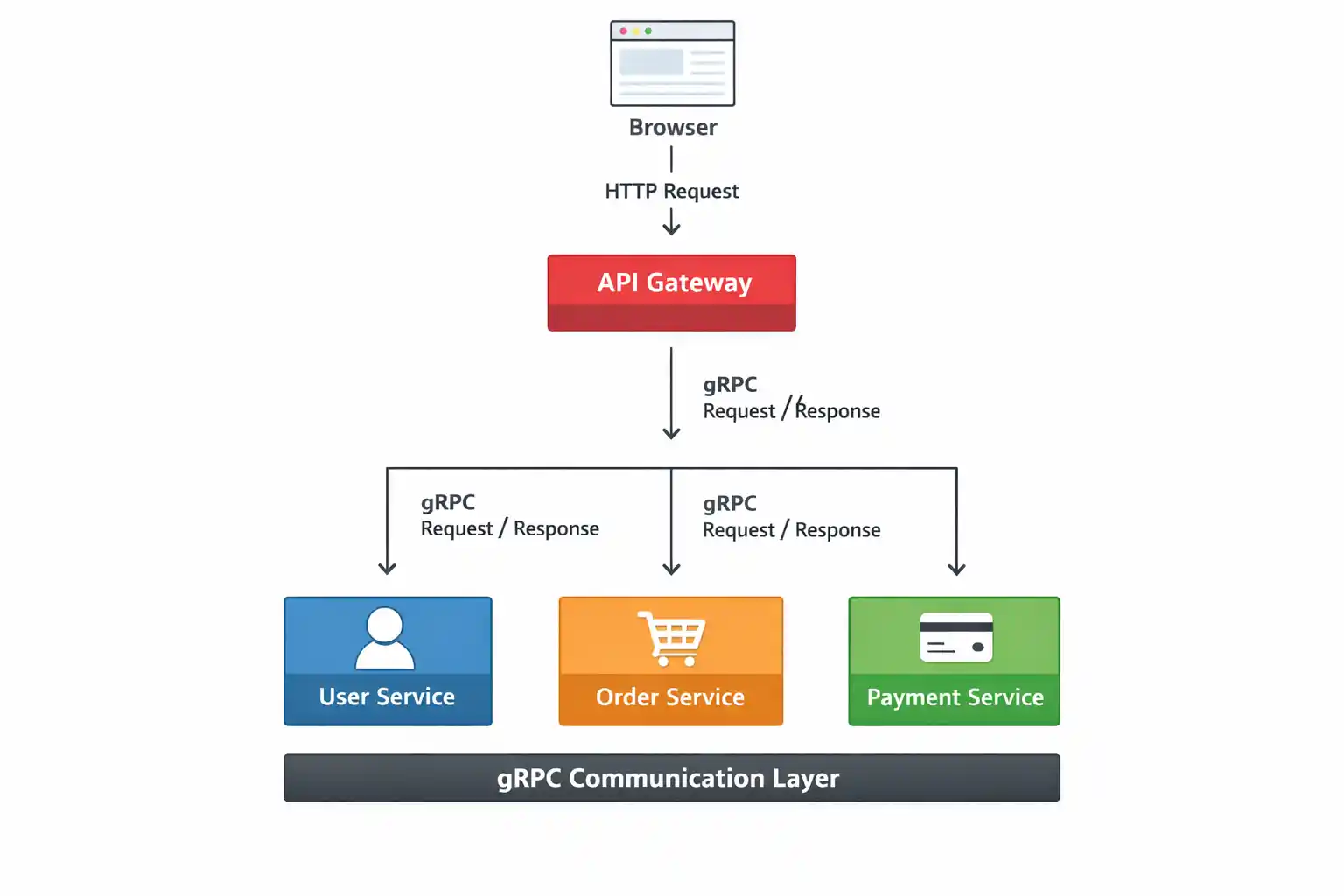
This architecture demonstrates how NestJS microservices communicate using gRPC with a centralized API Gateway.
High-Level Flow
The client (browser) sends an HTTP request to the API Gateway.
The API Gateway acts as the single entry point for all client requests.
The API Gateway forwards the request to the appropriate microservice using gRPC.
User Service, Order Service, and Payment Service process the request and return a gRPC response back to the API Gateway.
The API Gateway sends the final HTTP response to the client.
Architecture Diagram
Key Differences: Kafka vs gRPC
Both Kafka and gRPC are widely used in microservices architectures, but they serve different purposes and communication patterns.
Kafka
Event-based and asynchronous communication
Uses a message broker (Kafka broker)
Best suited for event-driven architectures
Supports message replay and loose coupling
Highly scalable and fault-tolerant
gRPC
Synchronous request–response communication
Direct service-to-service communication
Best suited for API-based communication
Enforces strong contracts with Protobuf
Low-latency and high performance
When to Use What?
Use Kafka for events, workf lows, and background processing
Use gRPC for real-time APIs and synchronous service calls
In real-world systems, Kafka and gRPC are often used together to build scalable and efficient microservices.
Prerequisites
Node.js installed
NestJS CLI installed
Basic understanding of microservices
Step 1: Install NestJS CLI
npm i -g @nestjs/cli
Choose npm or yarn and enable TypeScript.
Step 2: Create NestJS Applications
3 Microservices
API Gateway – Client
#1 nest new user-service
#2 nest new order-service
#3 nest new payment-service
#4 nest new api-gateway
Each service runs independently – this is the core idea of microservices.
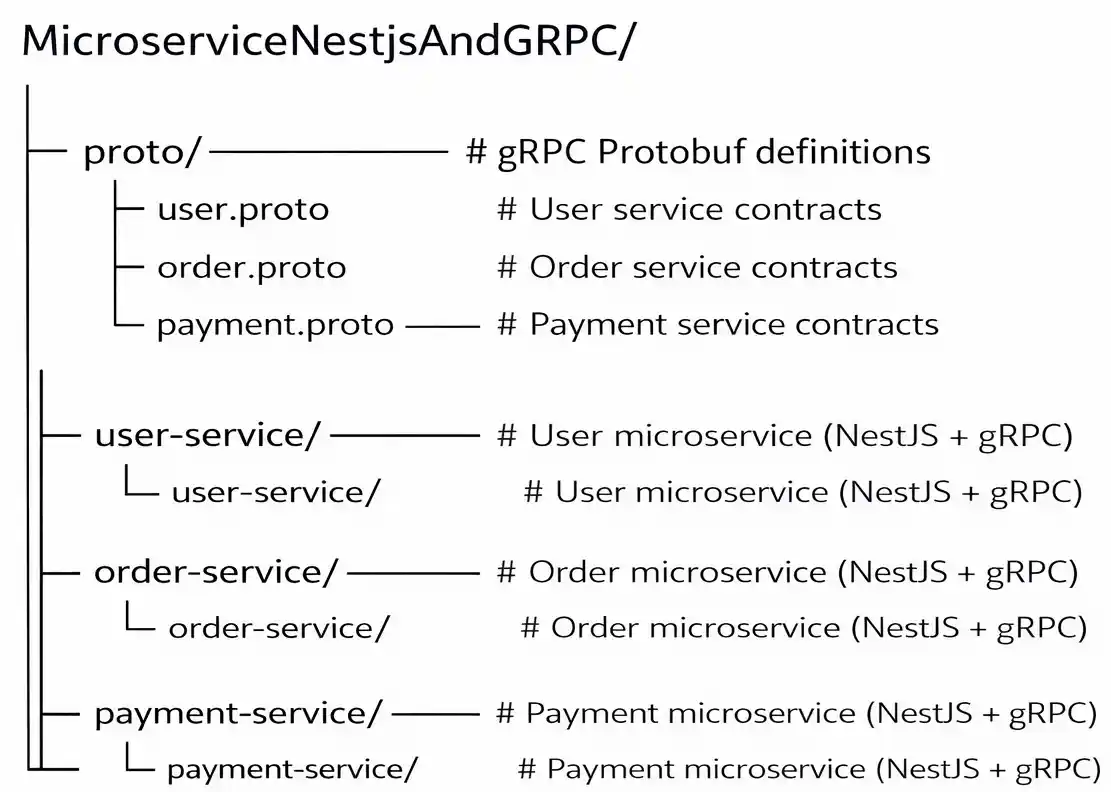
Note: Proto files are shared across services and stored in a central proto directory. Each microservice exposes and consumes only the proto files it requires.
Step 5: Configure User Service (gRPC Server)
open user-service/src/main.ts
import { NestFactory } from '@nestjs/core';
import { AppModule } from './app.module';
import { Transport, MicroserviceOptions } from '@nestjs/microservices';
import { join } from 'path';

async function bootstrap() {
  const app = await NestFactory.createMicroservice<MicroserviceOptions>(
    AppModule,
    {
      transport: Transport.GRPC,
      options: {
        url: 'localhost:5001',
        package: 'user',
        protoPath: join(process.cwd(), '../proto/user.proto'),
      },
    },
  );

  await app.listen();
  console.log('User gRPC Service running on port 5001');
}
bootstrap();
Get in touch with Prishusoft – your trusted partner for custom software development. Whether you need a powerful web application or a sleek mobile app, our expert team is here to turn your ideas into reality.